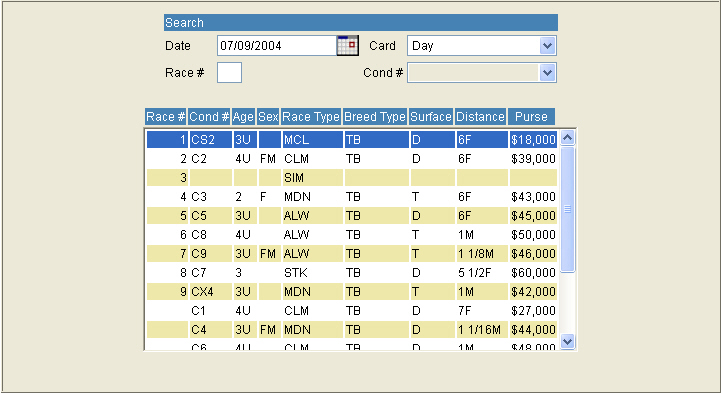
Using the Draw Maintenance screen, select Simulcast from the Cond # dropdown box. The system will prompt you for the track and race number of the Simulcast race.
Track – Select the name of the Simulcast Track from the list of available tracks.
Race Date - The Race Date will be defaulted from the draw screen and is display only.
Race Card – choose from D for the first card of the Day or E for an Evening Card when there are two cards running on one day.
Race Number – Select the number of the race you wish to include in your program.
Under the Cond # column the Track and race number will appear example: Sar-5.
Once the track, card and race number is selected, the race will be listed in the grid. See Race 10 in the example below:
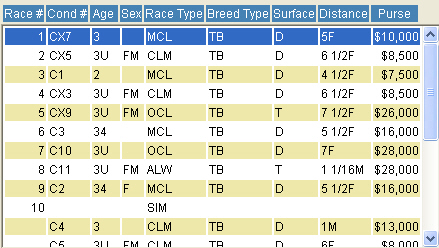
When the Live track generates an Overnight Sheet, the Simulcast race will be indicated. See race 10 in the example below:
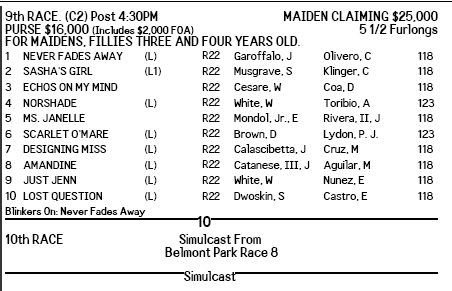
When the final program is printed, the simulcast race will be included in the file that is placed on the InCompass Simo Central Website. A page will print in your live program that displays your race number and simulcast’s track and race number. See the example below:
